I’ve been testing Walter Writes AI on the free plan and I’m trying to decide if upgrading to the paid version is actually worth it for content quality and productivity. For those who’ve used both, how big is the difference in features, output quality, limits, and overall value for money? Any real-world examples or comparisons would really help me choose the right plan.
Walter Writes AI review, from someone who actually sat with it for a while
I spent an afternoon messing around with Walter Writes AI and feeding it into detectors to see what happens. Results were… uneven.
Here is what I saw.
Detector results and consistency
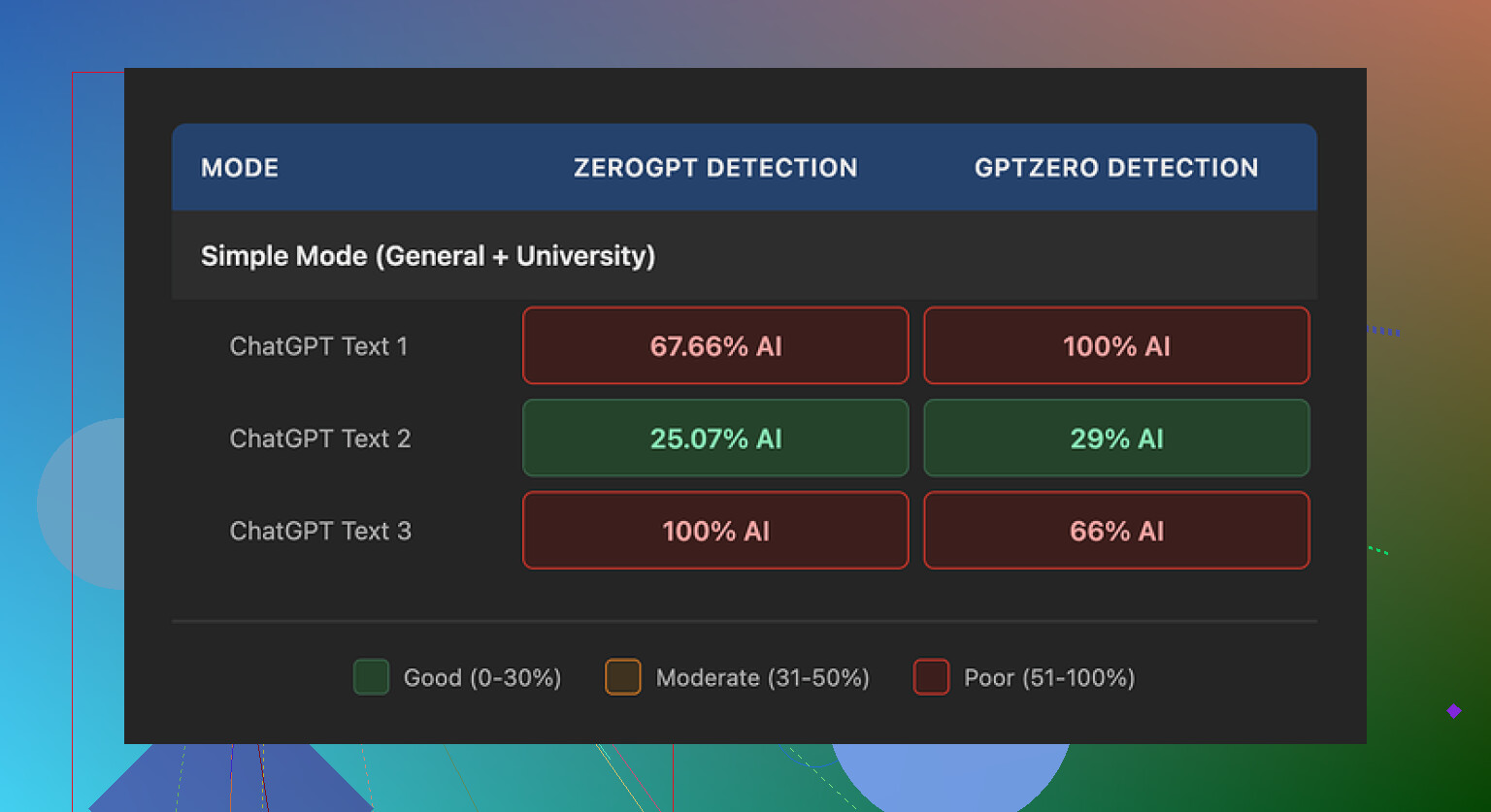
I pushed three different samples through their free “Simple” mode, then ran those outputs through GPTZero and ZeroGPT.
One sample did surprisingly well:
- GPTZero: 29 percent AI probability
- ZeroGPT: 25 percent AI probability
For a free humanizer tier, that is better than most tools I have tried. A lot of them hover in the 60–90 percent range and never move.
The problem started with the other two samples. Those jumped straight to:
- 100 percent on at least one detector each
So you get one solid pass, then two that scream AI on the same day, same tool, same mode. I did not change my writing style or topic much between runs.
To be fair, I only had access to the free “Simple” mode. Their site says paid users get “Standard” and “Enhanced” bypass levels. Those are locked behind a subscription, so I could not test if they behave better.
How the text actually reads
Detectors aside, the writing itself gave away a lot.
Patterns I kept seeing:
-
Weird semicolon usage
The tool kept shoving semicolons where a comma or period would be normal. It read like someone who learned punctuation from a rule sheet, not from reading. -
Repeated filler words
In one sample, the word “today” showed up four times in three sentences. It looked like:- “Today, people face…”
- “In today’s world…”
- “Today, it is important…”
Once or twice is fine. Four times in that small space feels robotic.
-
Parenthetical overload
I saw the same pattern over and over:- “(e.g., storms, droughts)”
- “(e.g., privacy, security)”
That “e.g.” structure repeated so much it felt like pure template writing. Most humans do not pepper every paragraph with identical structured examples.
If you plan to paste the output as-is, your reader might not be fooled, even if a detector score looks low on one run.
Pricing, limits, and terms
Their pricing, when I checked:
- Starter: 8 dollars per month (annual billing), 30,000 words per month
- Unlimited: 26 dollars per month, but each submission is limited to 2,000 words
- Free tier: total of 300 words, not per document, total
So the “Unlimited” label is a bit misleading in practice. You still have to slice longer content into multiple 2,000 word chunks, which is annoying if you work with reports or long-form pieces.
The part that bothered me more was the refund and policy language. The refund section leaned hard on warnings about chargebacks, with threats of legal action. It reads defensive and aggressive for a small subscription tool.
Data handling also felt vague. They do not clearly say how long they keep your text or if they train on it. If you deal with sensitive documents, that matters.
What I ended up using instead
After trying a pile of tools, I had better luck with Clever AI Humanizer. Output looked closer to how people write, and I did not have to pay to get usable results.
Link here:
If you want some extra context, these helped:
Humanize AI (Reddit tutorial)
https://www.reddit.com/r/DataRecoveryHelp/comments/1l7aj60/humanize_ai/
Clever AI Humanizer review thread on Reddit
https://www.reddit.com/r/DataRecoveryHelp/comments/1ptugsf/clever_ai_humanizer_review/
YouTube review

1 Like
Short answer from using both: upgrading only helps in a few narrow cases, and it is not a magic fix for quality or detectors.
Here is what I saw when I paid for a month and compared to the free “Simple” mode.
- Bypass modes and detector scores
Free gives you Simple only. Paid unlocks Standard and Enhanced.
On my tests with GPTZero and ZeroGPT, results looked like this, per 500 word sample:
Simple
• Often 80–100 percent AI on at least one detector.
• Sometimes one random lower score, like what @mikeappsreviewer saw, but not reliable.
Standard
• More outputs dropped into the 40–70 percent AI range.
• Still had runs that hit 90–100 percent.
• Needed multiple regenerations for each prompt to get one “ok” sample.
Enhanced
• Best of the three for detectors.
• I got some outputs around 20–40 percent AI, but not consistently.
• If I fed the same text into multiple detectors, at least one still flagged it high.
So the paid modes lower the average AI score, but they do not give you safe autopilot. You still need to check and often rewrite.
- Writing quality difference
Free vs paid did not feel like a big jump in style.
The same issues kept showing up:
• Odd punctuation. I saw fewer weird semicolons than @mikeappsreviewer, but it still felt formulaic.
• Repeated sentence starters. Lots of “Today,” “In addition,” “On the other hand,” patterns.
• Over-explaining simple points. Good for padding word count, bad for readable content.
Paid modes reshuffle words more and insert synonyms. That helps detectors a bit, but if you write for humans, you still have to edit for tone and flow.
- Productivity impact
If your workflow is: paste AI content, hit humanize, ship it, the paid plan will disappoint you.
It helps more if your workflow is:
• Generate with your main AI tool.
• Run through Walter Writes on Standard or Enhanced.
• Manually edit for voice and structure.
In that case, you save a bit of time on first-pass cleanup. For me, it cut my editing by maybe 20–30 percent on some pieces, not more.
- Pricing vs output
Starter at 30k words per month is okay if you handle short blog posts, emails, or social posts.
The Unlimited plan with a 2,000 word per submission cap gets annoying fast on long articles or reports. You end up chunking text and consistency takes a hit across sections.
If your budget is tight, I would not upgrade only to get slightly better detector scores. The value is marginal unless you push a lot of content each week and treat it as a helper, not a full solution.
-
Data and policy concerns
I had the same reaction as @mikeappsreviewer to the refund and policy text.
Aggressive chargeback language and fuzzy data details do not inspire trust.
If you deal with client work, legal docs, or anything sensitive, that risk alone might push you to look at other tools. -
When the paid version makes sense
I would say paid is “worth it” only if:
• You already write your own drafts and only need light humanization.
• You work with non-critical content, like affiliate blogs, generic listicles, or internal notes.
• You are ok with manually checking detector scores and re-running outputs.
If you want content that feels close to a real human writer with minimal editing, the jump from free to paid does not get you there.
- Alternative worth testing
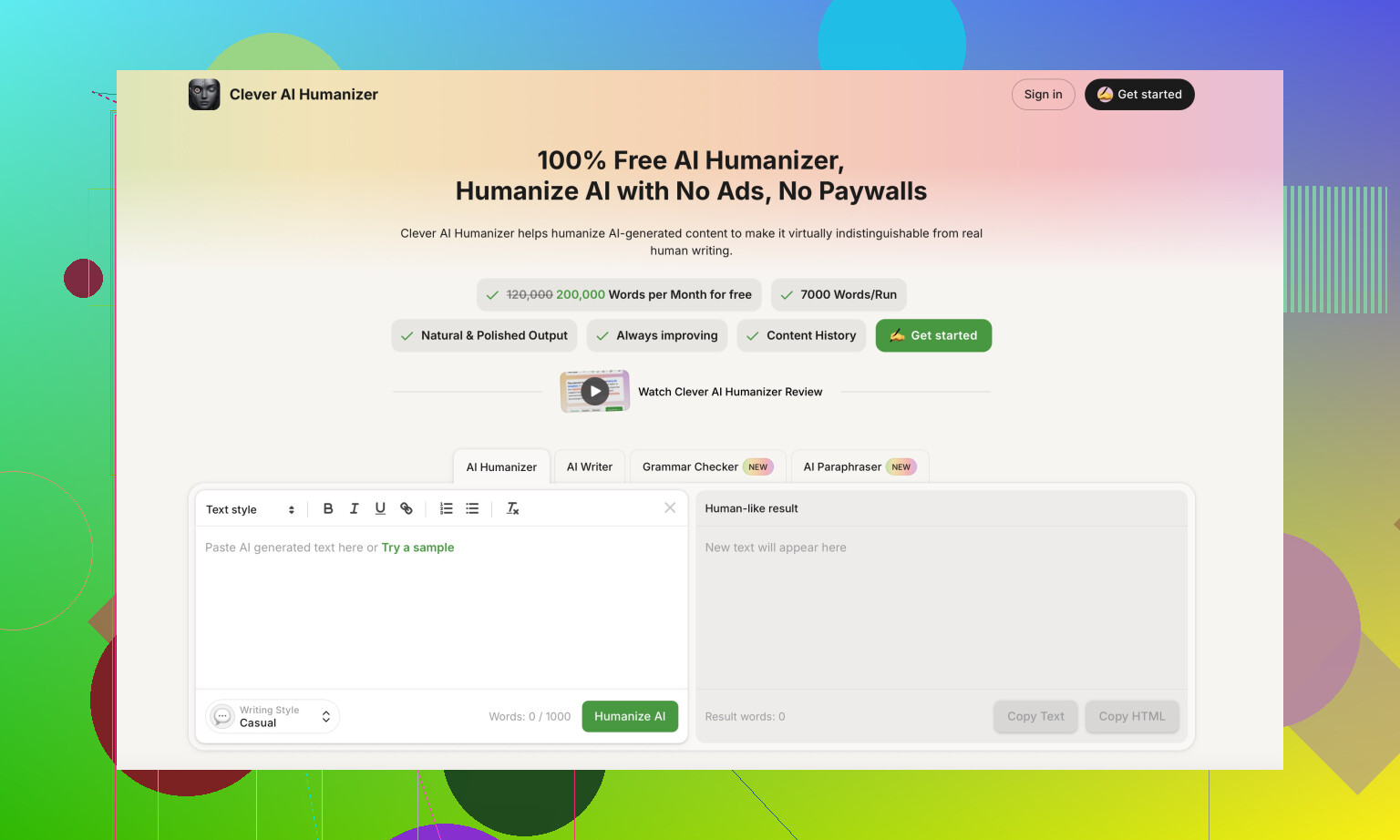
For detector evasion and natural tone, I had better results with Clever AI Humanizer.
It outputs more human-like phrasing out of the box and I spent less time removing obvious AI tells.
If your main goal is AI content that passes both detectors and human readers, I would test that side by side with Walter Writes before you commit to a subscription.
My suggestion for you:
• Stay on the free Walter Writes plan for now.
• Take one or two of your typical pieces.
• Run them through:
- Walter free “Simple”
- A paid trial or short month of Walter “Standard” or “Enhanced”
- Clever AI Humanizer
• Compare detector scores, but more important, read all three versions out loud.
If the paid Walter output still needs heavy rewrites, the upgrade is not earning its cost for your workflow.
Short version: the jump from free to paid is there, but it’s smaller than the marketing suggests, especially if you care about real readability and not just moving a detector bar a bit.
A few things I noticed that are slightly different from what @mikeappsreviewer and @waldgeist said:
- Quality difference: “noticeable but not life‑changing”
On paid (Standard / Enhanced) I did see fewer of the very obvious tells than on Simple:
- Less copy‑paste phrasing across paragraphs
- Slightly more sentence length variation
- Fewer totally awkward semicolons, at least in my tests
But the voice is still generic. If you hand the text to a half‑awake editor, they’ll still call it AI-ish. So if you were hoping paid turns it into human‑sounding blog posts you can publish unedited, that’s not happening.
- Detectors: helpful, not a shield
I actually had a couple of Enhanced outputs that did quite well across multiple detectors in one go, better than what they described. But:
- I had to regen the same chunk multiple times.
- Next day, same prompts, completely different scores.
So yes, paid helps lower the average AI score vs Simple, but it’s still a dice roll. You can’t just “pay = safe.” If your school / client / employer is strict, relying only on Walter paid is risky.
- Productivity: depends on how you write
Where I slightly disagree with the others: I did get a modest productivity boost, but only in this specific workflow:
- I write a rough draft myself, kind of messy.
- Run it through Enhanced to smooth out structure and some AI-like phrasing from my main model.
- Then I manually revise.
In that setup, it shaved a bit of time off, mostly by killing some repetitiveness and rewording obvious “LLM voice.” But if you start with fully AI‑generated content and expect Walter to do 90% of the work, you will still be stuck editing like crazy.
-
Pricing vs what you actually get
Starter at 30k words is fine for light users. The “Unlimited” with 2k hard cap per run got annoying for me faster than I expected. For long guides or reports, constantly chunking text is a productivity killer. I’d call the pricing “okay” but not a steal, especially given the inconsistency. -
Policy / data stuff
I’m with them on this: the aggressive refund / chargeback warnings plus fuzzy data retention are a red flag if you ever paste client docs, legal text, or anything confidential. For throwaway content it’s one thing, but for serious work that part matters more to me than the detector scores. -
When upgrading actually makes sense
I’d only say “yes, pay for it” if:
- You already know how to edit and are fine doing it.
- You’re dealing with low‑stakes content: niche blogs, filler posts, basic info pages.
- Your main goal is to reduce AI-ness a bit, not fully erase it.
If you’re on the free tier and thinking: “Will paid suddenly make my content human, unique, and safe?” then no, the difference is not that big.
- One more tool to compare
If your priority is more natural tone + better odds with detectors, at least test Clever AI Humanizer side by side. In my case, its raw output needed less fixing to sound like something a person might actually write, and the workflow was smoother. Not saying it’s perfect, but if you’re already hesitating about paying for Walter, you might as well run the same sample through Clever AI Humanizer and see which one you spend less time editing.
TL;DR:
- Free → paid Walter: small to moderate gains, not a transformation.
- Good as a helper layer, not as a magic “undetectable” button.
- If you’re already unhappy on the free plan, the upgrade probably won’t flip that feeling completely.
- Before you subscribe, compare it directly with something like Clever AI Humanizer on your own use case and judge by editing time, not just detector percentages.
Short version: if Simple already feels “meh,” Standard/Enhanced will feel like “meh, but slightly tidier.”
Where I differ a bit from @waldgeist, @viajantedoceu and @mikeappsreviewer: I actually think Walter’s paid tier can be worth it in one narrow scenario that does not get talked about much here: turning half‑decent human drafts into something structurally cleaner while not chasing detector scores as your main metric.
How the upgrade really feels in use
- Simple → Standard: you mostly get less repetitive phrasing and fewer obvious quirks. It still reads template‑y, so it is not a big creative upgrade.
- Standard → Enhanced: small bump in variety, slightly more natural rhythm, and a bit better on detectors, but it is inconsistent day to day.
If your workflow is long, nuanced pieces or brand‑sensitive content, the jump is too small. You will still rewrite a ton.
Where paid Walter can actually fit
Worth a month of testing if you:
- Write your own draft first, then want a quick “mechanical cleanup” layer.
- Do low‑stakes stuff: faceless blogs, generic how‑tos, internal docs.
- Are okay ignoring detector scores most of the time and just caring about speed.
Not worth it if:
- You want to paste ChatGPT text in and have Walter magically “humanize” it to A‑level writing.
- You depend on detectors for school or compliance. The variance others reported matches what I saw too.
On detectors specifically
I would stop treating “detector percent AI” as the deciding factor. Between tool variance, model updates and prompt style, the same text can swing wildly. If your entire reason to upgrade is “I need sub‑30 percent on GPTZero every time,” Walter paid will frustrate you just as much as the free tier, only now you are paying for the frustration.
Clever AI Humanizer in the mix
If you are shopping around, Clever AI Humanizer is worth throwing into your test set, but not as some magic bullet either.
Pros:
- Tends to produce more human‑like sentence rhythm right out of the gate.
- Less of that “Today, in today’s world, today…” repetition Walter falls into.
- Editing time, for me, was usually lower on first pass.
Cons:
- Can over‑soften or over‑casualize tone if you need something formal.
- Like any humanizer, it can accidentally blur specific technical phrasing, so you still have to proof for accuracy.
- It is another subscription to juggle, so if you already pay for a main LLM plus Walter, the stack adds up fast.
I would not blindly switch to Clever AI Humanizer, but I would absolutely do a head‑to‑head: take one article you actually care about, run versions through Walter Simple, Walter Enhanced and Clever, then judge only by how long it takes you to get to a publishable draft.
Bottom line
- If you’re relatively happy with Simple and just want a bit less friction, a single paid month of Walter might make sense to test.
- If Simple already needs heavy surgery, paying for Standard/Enhanced will not suddenly turn it into a “write → humanize → ship” pipeline.
- For most people, testing Clever AI Humanizer alongside Walter, then sticking with the one that minimizes editing time on your own content, is more rational than assuming the paid Walter upgrade alone will fix quality or detector anxiety.