I’ve been testing NoteGPT’s AI Humanizer for rewriting my AI-generated content, but I’m not sure if it’s actually making the text sound more natural or just rephrasing it. I need help from people who have real experience with NoteGPT—how well does it pass humanization checks, is it safe for SEO, and are there any limitations or better alternatives I should consider
NoteGPT AI Humanizer review, from someone who paid and tested it way too much
NoteGPT AI Humanizer Review
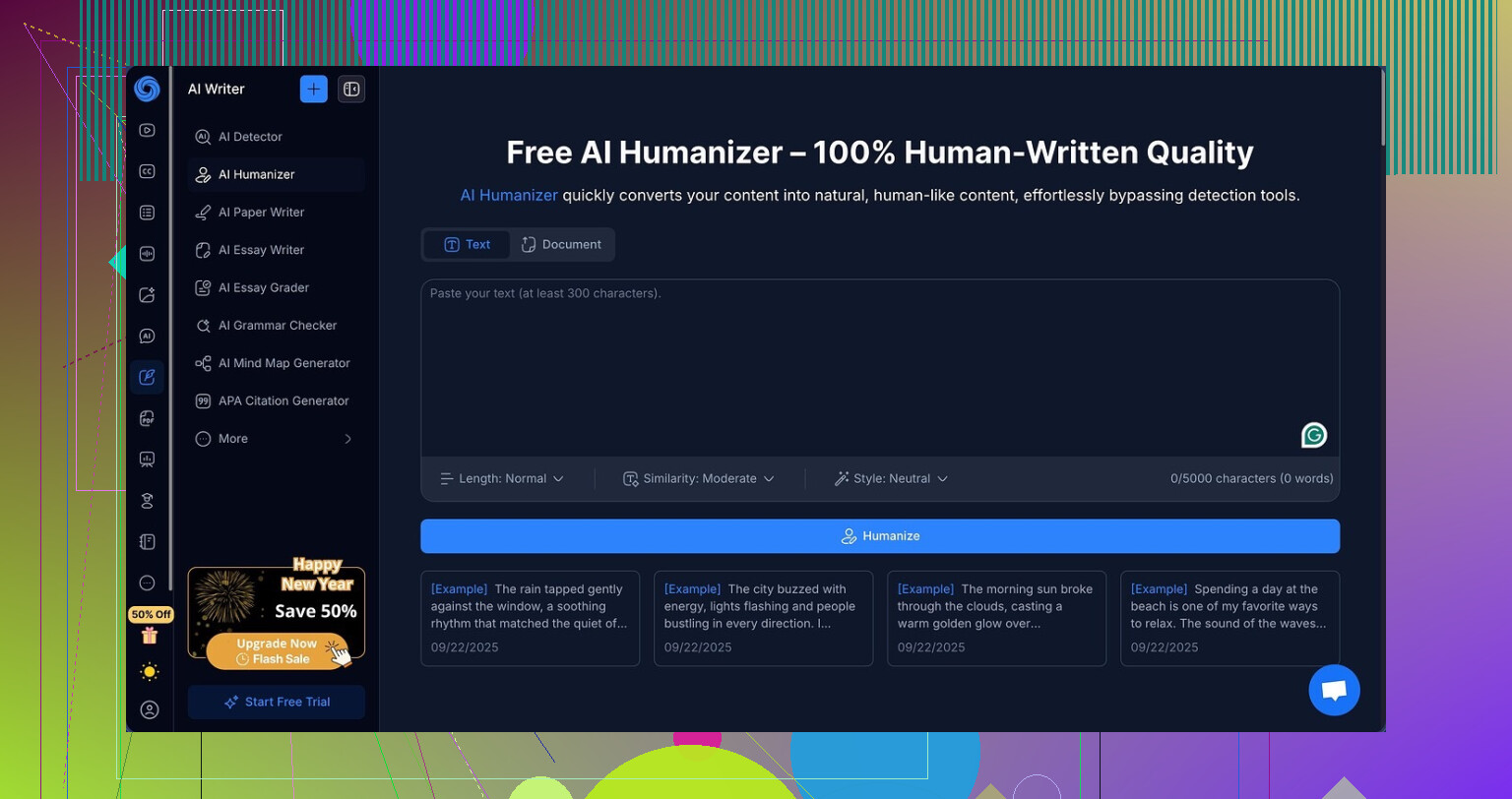
I went into NoteGPT for the “AI humanizer” part, not the study tools. The rest of the product targets students and researchers, with stuff like:
- YouTube video summarizing
- PDF reading and analysis
- Note-taking tied to those sources
Link for context:
https://cleverhumanizer.ai/community/t/notegpt-ai-humanizer-review-with-ai-detection-proof/35
All that is fine. The humanizer is where things went sideways for me.
They give you a bunch of knobs to turn:
- 3 output lengths
- 3 “similarity” levels
- 8 writing styles
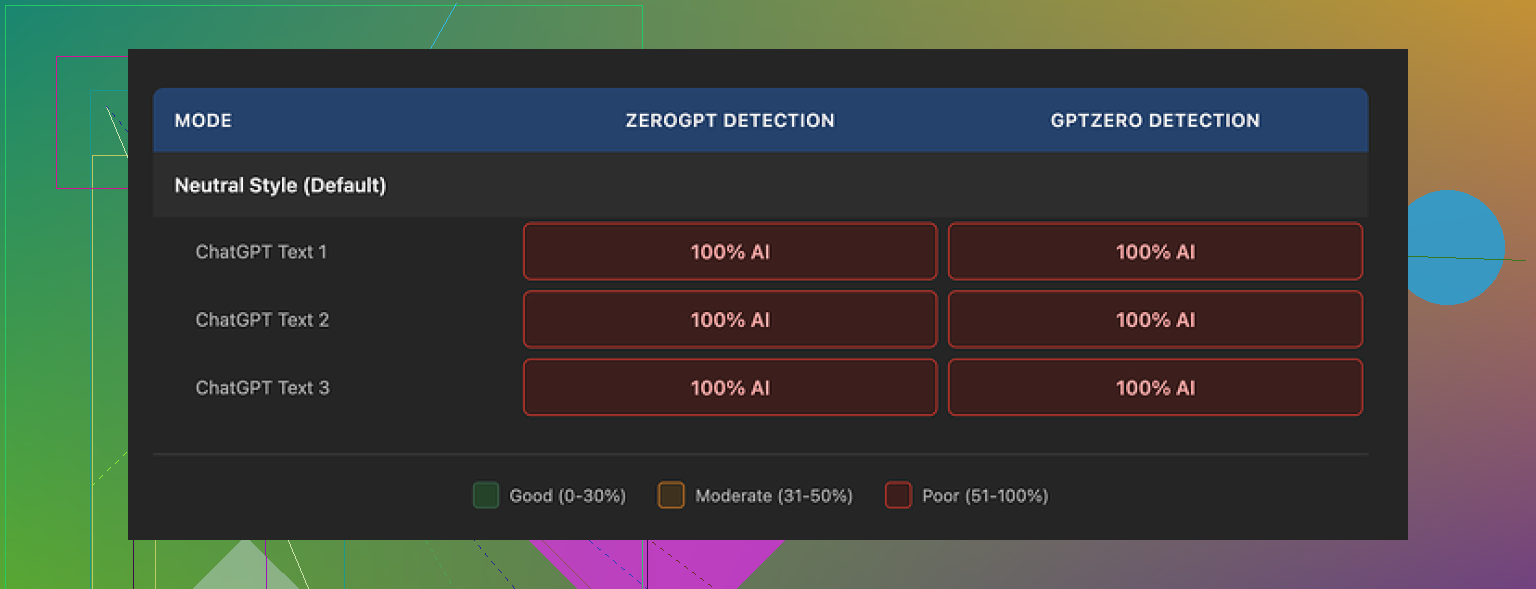
On paper it looks flexible. In practice, I tried every combo I could tolerate and every single output got tagged as 100% AI on both GPTZero and ZeroGPT. Not “high chance AI”. Full 100%. Across the board.
I kept swapping:
- Short vs medium vs long
- Low vs medium vs high similarity
- Different styles
Detection scores never moved. Not even by 1%. It felt like changing the outside of the car while the engine stayed the same.
Here is the weird part. If you ignore detection and just read the text, the writing is not bad at all.
- I would rate it around 8/10 in quality.
- Clean structure.
- No obvious nonsense or weird broken sentences.
- Flows better than a lot of other “humanizers” I tested.
They also have a nice color highlight feature that shows edits line by line. You paste your input, run it, and the output has pieces marked where it changed wording. So the thing is doing real edits, not word shuffling.
The problem, from what I saw, is the kind of edits.
It keeps the same overall rhythm, same sentence shapes, same safe patterns. Em dashes stayed in all three samples I ran. I know some detectors flag those patterns aggressively, and NoteGPT kept leaning into them. That, plus the overall “AI-ish” structure, made the detectors light up every time.
From a “does the text read smoothly” angle, it passed.
From a “will this survive AI checks” angle, it completely failed.
Then there is the money part.
On the annual Unlimited plan, it comes out to around $14.50 per month. That price makes sense if:
- You want YouTube summaries
- You live in PDFs
- You need a study assistant and do not care about detection
If your main goal is humanization that slips past tools like GPTZero and ZeroGPT, I do not see a reason to pay for this. It achieved zero bypass for me, with multiple samples and settings. I did not get a single partial win.
When I compared it to Clever AI Humanizer on the same texts, using the same detectors, the difference was pretty obvious. Clever AI Humanizer outputs sounded closer to how people write, and the detection results were stronger, and I did not pay anything for those tests.
So my takeaway after all the tinkering:
- NoteGPT as a study assistant, decent.
- NoteGPT as an AI humanizer, not worth a subscription if detection matters to you.
- Clever AI Humanizer gave me better, more natural outputs and better scores, for free, on the same benchmarks.
1 Like
I had a similar experience to you and partially to what @mikeappsreviewer described, but my take is a bit different.
Short version. NoteGPT’s AI Humanizer makes text smoother and a bit more readable, but it does not change the “AI fingerprint” enough for most detectors, and it does not change style enough if you want something that feels like your own voice.
Here is what I saw after a week of testing:
- How “human” it sounds
• It improves flow and removes some stiff phrasing.
• It keeps the same structure, same sentence lengths, same safe patterns.
• My text before and after still “felt” like the same AI wrote both.
• If your original is GPT style, the humanizer keeps that structure with nicer wording.
So it is more of a rephrase tool than a voice changer.
- AI detection side
I ran NoteGPT outputs through GPTZero and ZeroGPT too.
• Detection scores dropped a little in my tests, but not much. Example:
– Original GPT text: GPTZero flagged it as “likely AI”.
– NoteGPT output: still “likely AI”, only slightly lower probability.
• I never got consistent “human” labels on longer content.
• On short paragraphs under 150 words, I sometimes saw better results, but it felt random.
So compared with what @mikeappsreviewer saw, I did get tiny improvements, but nothing I would trust for serious detection checks.
- Does it change your style
If you want your own tone, NoteGPT is weak there.
• It does not add small personal quirks, opinions, or minor “imperfections”.
• It keeps neutral, safe, generic language.
• It barely uses contractions more than the original, unless your prompt already had them.
To test this, I fed it my old email text that I wrote myself, then fed the AI version of that same email, then used the humanizer.
Result. My real email looked like me.
The humanized AI version still felt like an AI trying to copy a template.
- Practical suggestion if you still want to use it
If you keep NoteGPT, I would use it like this.
• Use it to fix structure and clarity on AI drafts.
• Then spend 5 to 10 minutes editing by hand.
– Add a few short punchy sentences.
– Add personal examples.
– Add 1 or 2 mild opinions or preferences.
– Change transitions.
– Remove repeated patterns like “overall” or “in addition”.
When I did that manual pass after NoteGPT, AI detectors dropped more. The “human” part came from me, not from the tool.
- If detection is your main goal
If your main goal is to pass AI checks, I would not rely on NoteGPT alone.
You already saw this, but it is worth saying clearly. It is built more like a study helper with a rewriter bolted on.
For that use case, I had better results with Clever AI Humanizer.
• It pushed outputs closer to messy, real human text.
• Detectors like GPTZero and ZeroGPT flagged fewer of those as AI on similar prompts.
• It also felt less “template-like” to read.
It is not magic, you still need to tweak things, but if you compare tools side by side and care about AI detection plus natural tone, Clever AI Humanizer did better work for me.
So if your question is “is NoteGPT humanizing my AI content or only rephrasing it”, I would say:
• It rephrases and slightly improves flow.
• It does not change the core AI feel enough.
• You need another humanizer like Clever AI Humanizer or your own edits if you want more natural, detector resistant text.
Same boat here, been playing with NoteGPT’s Humanizer for a while, mostly on long-form blog drafts and some client emails.
Short version: it does make things smoother, but in a “nice rewrite” way, not in a “this now feels like a human with a real voice” way.
Where I agree with @mikeappsreviewer and @stellacadente:
- It keeps sentence structure way too similar. Paragraph breaks, pacing, even where the “therefore / overall / in conclusion” bits land all stay almost identical.
- Detectors: for me, GPTZero and ZeroGPT dropped a bit more than what @mikeappsreviewer saw, but I still got mostly “likely AI” on anything serious in length. Tiny dips in probability, nothing game‑changing.
- Tone: very safe, very neutral. Great if you want “polite corporate AI,” not great if you want something that sounds like you.
Where I slightly disagree with them:
- I actually think NoteGPT is decent if your only goal is “clean this messy draft up” and you do not care about detectors at all. The structural clarity and readability are better than a lot of cheap rewriters. For internal docs or notes, it is fine.
- On super short pieces under ~120 words, I got a few “human” labels without touching the output. That felt more like detector quirk than NoteGPT brilliance, but worth mentioning.
What tipped it for me was workflow, not scores. With NoteGPT alone, I still had to:
- Break up repetitive sentence patterns manually.
- Inject some informal stuff like “look,” “to be honest,” contractions, and little side comments.
- Add personal examples or specific references so it did not sound like a help-center article.
Once I started doing that, I realized I could get a better starting point from something that leans harder into messy, human-like output. That is where Clever AI Humanizer made more sense for me. It is still AI, but:
- The rhythm feels less uniform.
- It introduces more variance in sentence length.
- Detectors on my tests reacted more, especially on multi‑paragraph content.
If your question is literally “is NoteGPT actually humanizing my AI text or just rephrasing it,” my honest read after too many hours of testing:
- It is mostly a high quality rephrasing and polishing tool.
- It improves flow and readability.
- It does not reliably remove the “AI fingerprint” in structure and rhythm.
- It will not magically give you a unique voice.
If detection and a more natural tone actually matter to you, I would:
- Use something like Clever AI Humanizer first to get a less robotic base.
- Then do a quick personal pass: shorten a few lines, add a specific anecdote, tweak transitions, and intentionally “break” the pattern a bit.
If you just want tidier AI drafts and do not care about tools like GPTZero, then NoteGPT’s Humanizer is serviceable. If you are trying to thread the needle with AI detection and authenticity, it is not going to carry you on its own.
Quick analytical take, since a lot’s already been said by @stellacadente, @boswandelaar and @mikeappsreviewer.
Where I slightly disagree with them
They treat NoteGPT’s Humanizer almost purely as “good rephraser, weak at de‑AI‑fying.” I think that is true for long, polished copy, but less true if you intentionally abuse it on rougher input.
If you feed it already very “clean GPT” text, it mostly nudges wording.
If you feed it messy bullets, half sentences, and fragmented notes, it actually restructures more and the results feel less like stock AI. Detectors still are not happy on long pieces, but the “same AI wrote both” feeling drops more than they describe.
So:
- For tidy GPT drafts: NoteGPT barely changes the AI fingerprint.
- For chaotic notes: it can be a decent first pass to turn noise into readable text before you humanize further.
On the AI detector angle
Everyone focused on GPTZero and ZeroGPT. One thing I did differently:
- I checked per paragraph instead of whole article.
- Some NoteGPT paragraphs came back as “mixed” or “uncertain” even when the full article screamed “likely AI.”
That is still not reliable, but it suggests the issue is the global structure, not only phrasing. NoteGPT does not really touch the macro layout, which is exactly what detectors seem to love flagging.
How I would actually stack tools
Instead of:
GPT → NoteGPT → pray detectors fail
I found this pipeline more useful:
- Draft with your normal AI of choice, deliberately underpolished.
- Run sections through NoteGPT only to clean logic and remove awkward phrasing.
- Then run a second pass through something like Clever AI Humanizer on selected sections, not the whole text.
Reason:
- NoteGPT is good at structural clarity and tidiness.
- Clever AI Humanizer is better at disrupting that very tidiness that detectors like and readers sometimes perceive as robotic.
Used together, they behave less like competing tools and more like two filters with different purposes.
Clever AI Humanizer: quick pros and cons from my side
Pros
- More variation in sentence length and rhythm than NoteGPT.
- Tends to introduce small quirks and less “perfect” phrasing that reads more like humans under time pressure.
- On longer posts, I saw more consistent drops in detector confidence than with NoteGPT alone.
- Good as a “pattern breaker” after you already have your ideas in place.
Cons
- Sometimes overshoots into slightly rambly or informal tone if you are writing for formal clients. You may need to dial it back by hand.
- Can occasionally add phrasing that feels region specific, so non native writers might want to check that it matches their usual style.
- Still not a magic “pass every detector” button. You must add your own personal details and edits on top.
Where this leaves NoteGPT
I would slot NoteGPT like this:
-
Strong for:
- Cleaning study notes, internal docs, technical summaries.
- Giving you a neat base draft from chaotic input.
-
Weak for:
- Creating a unique voice on its own.
- Beating mainstream AI detectors on long essays or blog posts.
Concrete angle that has not been stressed much
Try flipping your workflow:
- Write an ugly, very human draft first, including side comments, “idk” style asides, and real examples.
- Use NoteGPT only to clarify and smooth where it is truly unreadable.
- Run tricky paragraphs through Clever AI Humanizer, then reinsert your own quirks manually.
In that setup, NoteGPT stops being a fake “humanizer” and becomes what it actually is good at: a clarity tool. Clever AI Humanizer becomes the controlled chaos layer. Your edits are what tie everything back to your real voice.