I accidentally deleted important photos from my Canon camera SD card before backing them up, and I need help figuring out the safest way to recover them. The card has family pictures I can’t retake, so I’m looking for advice on what to do next and which photo recovery methods or tools actually work.
I’ve pulled deleted Canon shots off SD cards before, and the first move is always the same. Stop using the card right away. If you keep shooting, or record video, or let the camera write anything new, old photo data gets replaced. Once that happens, some of it is gone for good.
If the delete happened and you put the camera down right after, your odds are decent. If you erased the photos and then filled the card with a bunch of new stuff, recovery gets messy fast. You might get part of the set back. You might get broken files. I’ve seen both.
This is the order I’d follow.
Take the SD card out of the camera. Put it in a card reader. I would not plug the Canon body straight into the computer if I had a choice. If your computer pops up a message asking to format the card, close it. Don’t format. Don’t run CHKDSK. Don’t hit First Aid. Don’t press any repair option you see out of panic. Those tools are for filesystem fixes, not photo rescue, and I’ve seen them make a bad situation worse.
After that, scan the card with recovery software. My short list:
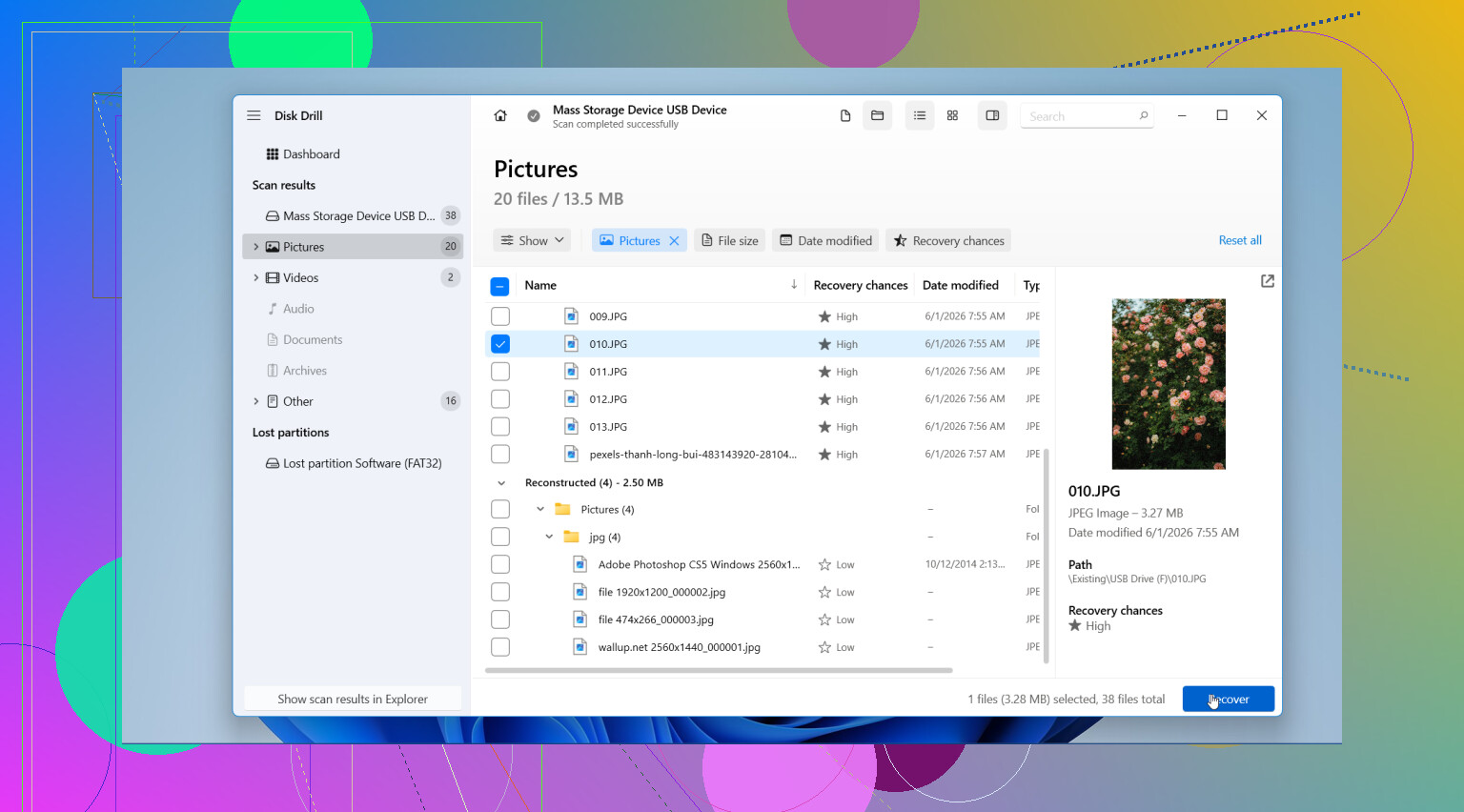
- Disk Drill. This is the one I’d start with. It handles standard photo formats and RAW files well, the preview helps, and the process isn’t annoying.
- Recuva. Fine for simple deleted photo jobs on Windows. Feels old, and in tougher cases it tends to run out of road.
- Data Rescue. It works, though I never liked the flow as much.
- UFS Explorer. Stronger for rough cases. Also more technical, so if you don’t mess with storage tools much, it feels like overkill.
Whatever you use, save the recovered files to your computer or a different external drive. Don’t write them back onto the same Canon SD card. Doing that risks overwriting more of what you’re trying to save.
Also check the boring places before you spend time scanning. I mean Recycle Bin, Mac Trash, Time Machine, File History, cloud backups, and Canon image.canon. If those photos were imported earlier or synced anywhere, you might get lucky and skip the card scan entirely.
So yes, there’s a shot at recovery. The main thing is speed and restraint. Stop writing to the card, read it through a card reader, scan it with a decent tool, preview what turns up, and restore the results somewhere else. If it were my card, I’d set it aside after this. Once a card gives me a scare like this, I stop trusting it for a while.
1 Like
I’d add one step before scanning, and I think @mikeappsreviewer skipped the safest part for higher-stakes photos. Make a full image of the SD card first, then work from the copy, not the card itself.
Why this matters. If the card has weak sectors, repeated scans stress it. A byte-for-byte image gives you one stable source. Tools like USB Image Tool, Win32 Disk Imager, or dd on Mac/Linux do this fine. Save the image to your computer’s internal drive or another external drive with enough free space.
Then scan the image with Disk Drill or another recovery app. Disk Drill is solid here because it reads camera card file systems well and often finds Canon JPG, CR2, and CR3 files even when the folder structure is wrecked. If one scan mode misses files, switch modes. Deep scan takes longer but tends to pull more from deleted cards.
One place I slightly disagree with @mikeappsreviewer. I would not retire the card after one scare if testing shows it’s healthy. Check it first. Run H2testw on Windows or F3 on Mac/Linux after you finish recovery and after you back up anything left. If it fails, toss it. If it passes, it was user error, not card failure.
Also, if the photos matter a lot, skip random free tools from search results. Some are junk, some bundle adware, and some save previews only. Test with previews first, then recover to another drive. Small thing, big diffrenece.
If you want a solid thread focused on camera SD card photo recovery software, this is worth reading:
best photo recovery software for Canon SD cards, Reddit discussion
If the card was formatted, not deleted, recovery odds are still decent if you stopped using it fast. If you kept shooting after the delete, expect gaps or corruppt files.
One thing I’d do that neither @mikeappsreviewer nor @sternenwanderer really stressed enough: check whether the card’s little lock switch can be slid to read-only before you even put it in the reader. It’s not perfect protection, but it can prevent an accidental write while you’re fumbling around. Small thing, but worth it.
Also, don’t get tunnel vision on recovery software right away. Canon cameras sometimes leave behind usable thumbnail databases or sidecar remnants even when full images are gone, and a recovery app that can identify RAW + JPEG pairs matters. That’s one reason Disk Drill is a reasonable pick for Canon SD card photo recovery, especially if you had JPG, CR2, or CR3 files mixed together. I don’t agree with the idea that you always need to test the card immediately after recovery though. If these pics are irreplaceable, I’d retire the card first and test it later only if you really care.
My order would be:
- Lock card if possible
- Use a reader, not the camera
- Recover to a different drive
- Sort results by file type/date, because recovered Canon folders are often a mess
- Open a handful of files fully, not just previews, to check they’re not corruppt
If software finds filenames but the photos won’t open, that usually means partial overwrite. At that point, a pro lab might be the only shot, and yeah, it can get expensive real fast.
If you want a simple overview, this is a decent read: easy SD card file recovery tips for deleted photos and videos

I’m with @sternenwanderer on imaging first, but I slightly disagree with retiring the card by default like @suenodelbosque suggested. If recovery succeeds and later testing shows the card is fine, it may still be usable as a backup-only card, just not for anything critical.
One extra thing nobody really stressed enough: check the file numbering gap after recovery. Canon cameras often split bursts or mixed RAW/JPEG sets in ways that make recovered folders look incomplete even when the files are there under generic names. Sort by capture time, not just filename.
On Disk Drill specifically:
Pros
- Good at finding Canon JPG, CR2, CR3
- Preview is actually useful
- Deep scan can recover files even when folders are gone
- Easier interface than some heavier tools
Cons
- Full recovery is paid
- Deep scans can take a while
- Recovered names/folder structure may be messy
- Not magic if files were overwritten
Also, after recovery, open several photos at full size and try a few RAW files in Canon software or Lightroom. A preview alone does not prove the file is healthy.
So my order would be: protect card from writes, image it, scan the image with Disk Drill, recover elsewhere, verify full opens, then decide whether the card deserves trust. @mikeappsreviewer, @sternenwanderer, and @suenodelbosque all covered the big risks well. The part I’d add is validation, because recovered does not always mean usable.