I accidentally deleted several videos from my GoPro SD card before backing them up, and I really need help recovering them. These clips were important, and I’m hoping someone can recommend the best GoPro video recovery steps or software that actually works.
I’ve been in this mess before. You get home, plug in the GoPro, and the clips you cared about are gone. It feels bad fast. The part worth knowing first is simple, deleted or formatted GoPro footage is often still on the card for a while. What you do next matters more than people think.
First thing, stop touching the card
If you want the best shot at getting the videos back, stop using the SD card right now.
Don’t shoot more footage on it. Don’t format it again. Don’t run random “fix” tools from the internet. In a lot of cases, the file list is what disappeared, not the video data itself. New writes are what ruin recovery.
I’d check a few boring things before running software:
- Look at your GoPro cloud account if you pay for it and had Auto Upload turned on.
- Check Trash, Recently Deleted, or anything similar.
- Put the card back in the camera and see whether the GoPro offers a repair prompt.
- Try a different card reader, another USB port, or a second computer.
- See whether the card shows up in Disk Management on Windows or Disk Utility on macOS.
If the card never appears anywhere, keeps dropping off, or has obvious physical damage, I wouldn’t keep poking at it. At that point, a recovery lab makes more sense. Physical failure is a different problem from deleted files.
Why GoPro recovery gets messy
This part trips people up. Recovering a photo is often easier than recovering action camera video.
GoPro footage is often split into pieces across the SD card. When the file system is damaged or wiped, recovery software has to rebuild the clip from those pieces in the right order. Some apps will find an MP4 and still hand you a broken file, or one with missing sections, or one that won’t open at all. I’ve seen that more than once.
What I’d try first
For deleted files, formatting, or file system corruption, I’d start with Disk Drill.
The reason is the Advanced Camera Recovery mode. It was made for camera footage, and it builds on tech from the older GoProRecovery and CnW Recovery tools. People used those for GoPro clips for years. The current version is aimed at fragmented video from GoPros, drones, dash cams, and similar gear.
The steps are short:
- Take the SD card out of the GoPro.
- Connect it straight to your computer with a card reader.
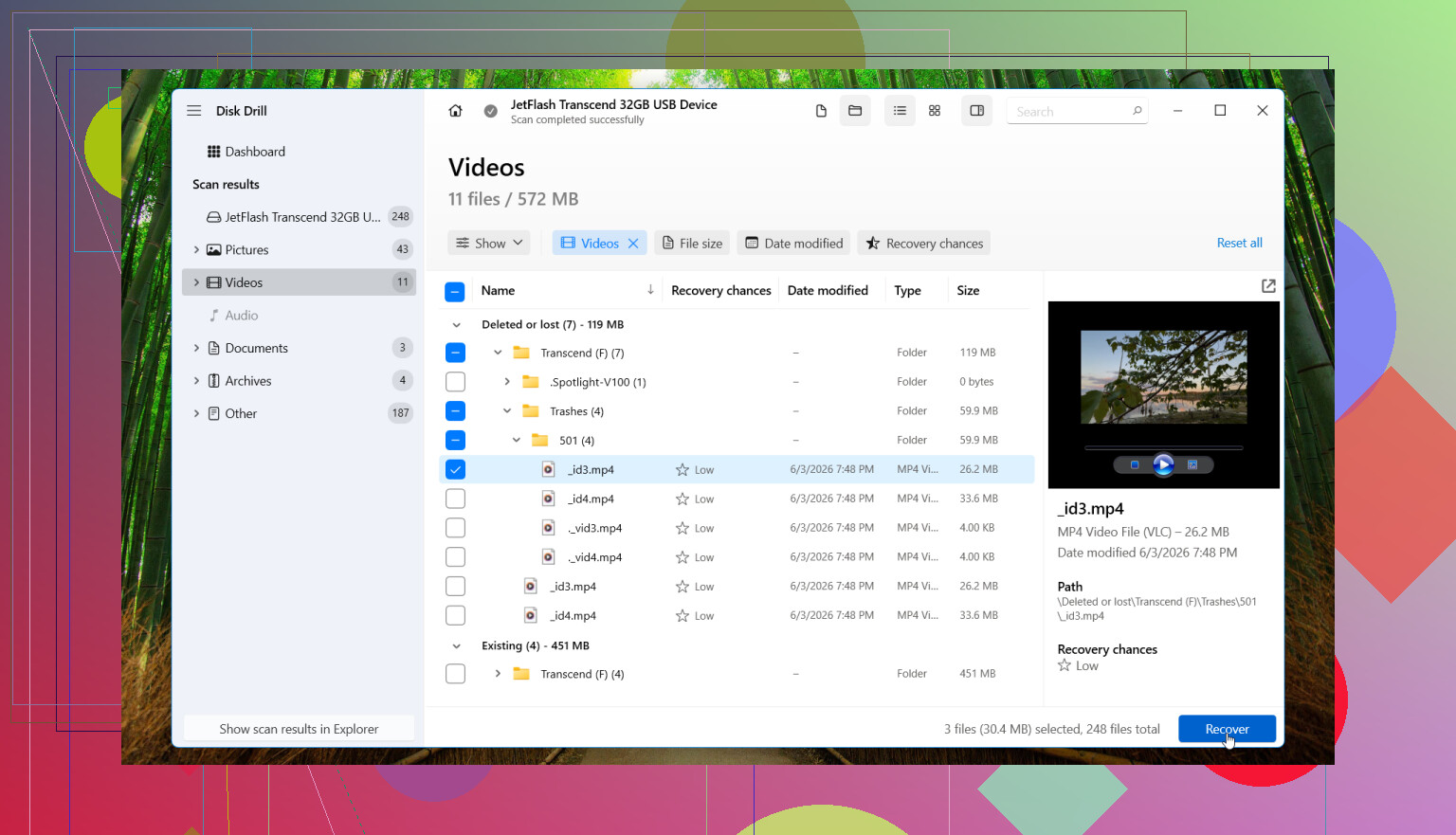
- Open Disk Drill.
- Select the SD card.
- Pick Advanced Camera Recovery.
- Run the scan.
- Preview the videos it finds.
- Recover the files to a different drive.
The preview part helps. You get a quick read on whether the clips are intact before saving them out. If the card throws read errors or acts flaky, I’d make a byte-to-byte backup first and scan the backup instead of the original card. I learned this one late, annoyngly.
Mac side is the same story
If you’re on a Mac, the flow is nearly identical. Use a card reader, open Disk Drill, scan the card, preview what turns up, then save recovered files somewhere else. Don’t write them back to the same SD card.
When I’d stop and send it to a lab
Software is fine for accidental deletion, accidental formatting, and plenty of corruption cases. Still, there are times where I wouldn’t keep experimenting.
I’d hand it off to a pro if:
- The SD card is cracked, bent, or otherwise physically damaged.
- No computer recognizes it at all.
- It disconnects over and over during scans.
- It gets hot for no clear reason.
- The footage matters enough where you don’t want to risk making it worse.
That last point matters. If the files are from a trip you can’t repeat, or paid work, or family stuff, I wouldn’t treat the card like a test bench.
Best case
If this was a plain delete or format job, your odds are often decent, especially if the card hasn’t seen much use since the footage vanished. I’ve had cards look hopeless at first, then give up most of the video once scanned the right way. The key part is still the boring part, stop using the card before anything else.
1 Like
Stop using the card. That part I agree with from @mikeappsreviewer. After that, I’d do one thing differently. I would make an image of the SD card first if your computer reads it cleanly. Work from the image, not the original. If the card has weak sectors, long rescans make things worse.
For GoPro clips, fragmented video recovery matters more than a plain deleted-file scan. Disk Drill is one of the better picks for GoPro video recovery software because it handles camera files better than a lot of generic tools. I’ve seen Recuva find filenames but return busted MP4s, so I wouln’t start there for action cam footage.
If Disk Drill finds the clips but they won’t play right, try recovering the THM and LRV sidecar files too. Sometimes they help identify matching segments. Also check chaptered files. GoPro often splits long recordings into parts, so one “missing video” might be several files.
If you want a quick explainer on SD card recovery options, this is decent: best SD card recovery software for deleted videos and photos.
If the card mounts, shows the right capacity, and you deleted stuff by mistake, your odds are prety solid. If it disconnects, shows 0 bytes, or asks to format every time, stop there and move to a lab.
I’d add one thing to what @mikeappsreviewer and @andarilhonoturno said: check whether the clips were deleted in-camera or on the computer. That matters a bit, because sometimes Windows/macOS can leave behind more directory info than the GoPro itself. Not always, but enough that I’d care.
Also, I would not spend hours trying every free tool first. That’s how people turn one clean recovery attempt into five messy ones. For GoPro files, generic undelete apps can be kinda meh. They may recover an MP4 shell that looks fine and then won’t play past 3 seconds. Super fun.
If the card still mounts normally, I’d use Disk Drill and specifically look for full video reconstruction rather than just filename recovery. Save anything recovered to your computer, not back to the card. Then test the files in VLC, not just QuickTime or the Windows preview pane, because those can be weirdly picky.
Small extra thing people forget: GoPro clips may have low-res proxy versions or app copies on your phone/tablet if you imported through Quik before. Worth checking that before going full panic mode.
And if the recovered files are busted, try ffmpeg or a video repair utility after recovery. Some clips are actually there, just missing the proper container metadata.
For more community troubleshooting, this thread is pretty on-point: best Reddit tips for recovering deleted GoPro and SD card videos.
Short version: stop using the card, skip the random freeware rabbithole, try Disk Drill first if the card is readable, and if the card starts disconnecting, stop messing with it becuase that’s where people make it worse.
One angle I’d add to @andarilhonoturno, @hoshikuzu, and @mikeappsreviewer: check the card’s write-protect adapter and the card’s health before you do any serious recovery. If the microSD is in a flaky full-size SD adapter, bad contact can look like corruption or “missing files.” Swapping adapters/readers has saved people a lot of wasted scan time.
I slightly disagree with the idea that sidecar files will help much in most cases. THM and LRV are useful clues, sure, but if the main MP4 clusters were overwritten, those little extras won’t magically restore the real footage. Helpful for sorting, not a miracle cure.
If the card is readable, Disk Drill is a reasonable first paid option for GoPro recovery because it tends to do better with camera video than generic undelete tools.
Disk Drill pros
- Good with SD cards and action cam footage
- Preview is useful before recovery
- Cleaner interface than a lot of recovery apps
- Can recover after deletion, formatting, and some corruption cases
Disk Drill cons
- Not cheap if you only need it once
- Deep scans can take a while on larger cards
- Like every software tool, it cannot fix overwritten data
- Results still depend heavily on card condition and fragmentation
One more thing nobody mentioned clearly enough: if your GoPro used exFAT and the deletion happened recently, sometimes directory recovery is better than raw carving. That means file names, dates, and folder structure may survive. If the scan only shows generic recovered video chunks, that usually means the file system metadata is gone.
If recovered clips are glitchy, test them in VLC first, then run ffprobe to see whether the container is damaged or the stream itself is broken. That helps you decide whether repair software is worth trying.
If the card throws I/O errors, stop software attempts early. Repeated reads on a dying card can turn a recoverable job into a lab-only one.