I’m struggling to rephrase some sections of my research paper so they’re clearer and more original, but still sound academic and natural. I’ve tried a few tools that either change the meaning, add plagiarism risks, or limit usage behind paywalls. Can anyone recommend a reliable, truly free paraphrasing tool that works well for college-level essays and articles, and won’t mess up citations or technical terms?
I used QuillBot for a long time and it did the job. Then they locked most tones and styles behind a paywall and it stopped fitting how I work.
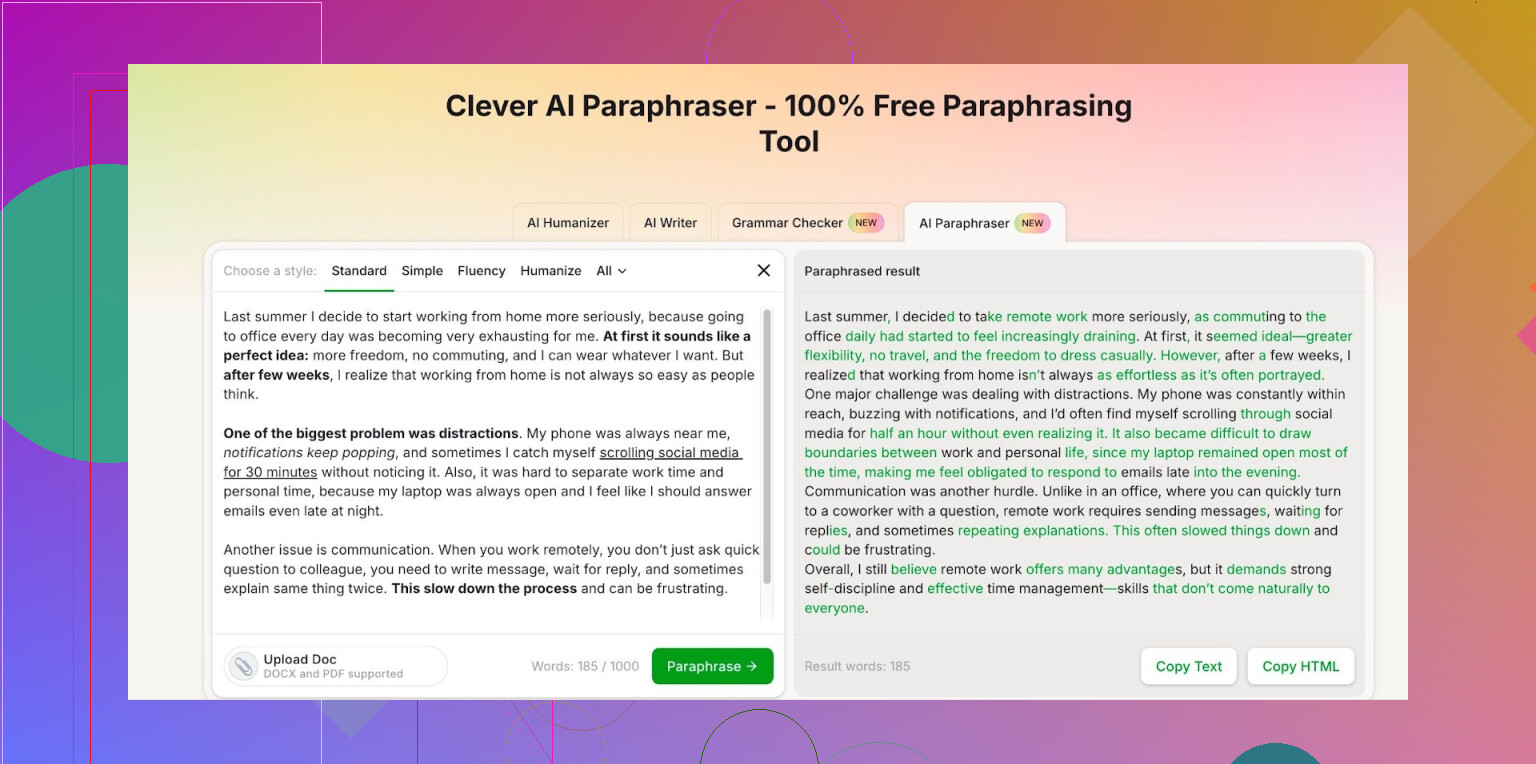
I went looking for something else and ended up on Clever AI Humanizer. Their Free AI Paraphraser here:
From what I can tell, it feels on par with what I got from QuillBot before the paywall shift, maybe newer under the hood, hard to say for sure. The point is, it does not lock the styles I use most often.
Some details from my own use:
- You log in, then you get about 7,000 words per day.
- Monthly cap is around 200,000 words.
- That has covered my weekly workload without me hitting the ceiling so far.
- I use it for rephrasing sections of reports, cleaning up rough drafts, and adjusting tone for emails.
If your usage is similar, you might not need to pay for anything. The free tier has been enough for me, so I stopped paying for QuillBot and moved over to this instead.
2 Likes
I get why you are frustrated. A lot of “paraphrasers” either wreck the meaning or spit out stuff that sounds like a robot swallowed a thesaurus.
Quick thoughts, trying not to repeat what @mikeappsreviewer already covered:
-
Use tools as a helper, not a final author
For academic writing, treat any paraphraser as a first draft.
Paste a paragraph.
Let the tool rewrite it.
Then you edit line by line to match your voice and your field’s terminology.
This cuts plagiarism risk and weird phrasing. -
Clever Ai Humanizer for academic tone
Since you care about “academic and natural”, Clever Ai Humanizer is actually solid for that.
It handles long sentences and technical phrases without changing the meaning too much, if your input is clear.
What works well:
– Rewriting dense sentences into 2 shorter ones.
– Swapping word order and structure while keeping key terms.
– Preserving citations and numbers if you keep them as is in your input.
Do small chunks, like 2 to 4 sentences at a time. You get cleaner output and fewer logic errors. -
Protect your meaning
After paraphrasing, check three things:
– Definitions of key terms stay exact.
– Quantitative results are identical.
– Causal logic does not flip.
I sometimes run the paraphrased version back through a quick “summarize this” prompt to see if the summary still matches the original point. -
Avoid paraphrasing sources too closely
If you are rephrasing text that comes from someone else, do this workflow instead of blind paraphrasing:
– Read the original.
– Close it.
– Write your own explanation from memory in simple language.
– Then, if it sounds too informal, use Clever Ai Humanizer to “formalize” or “make it academic” without touching the substance.
That keeps you safer than running source text straight into a tool. -
Check yourself against a similarity checker
For parts where you are worried about plagiarism risk, throw both original and your paraphrased text into a similarity checker like Turnitin or a free alternative your institution supports.
If the overlap is high, change structure again manually. -
Use consistent prompts for tone
When you use any AI paraphraser, add a short instruction, for example:
“Rephrase for academic writing in social sciences. Keep meaning and technical terms. Shorten where possible.”
If you find a version you like, save that instruction and reuse it so your paper keeps a consistent style.
If you post a sample paragraph here, I can walk through how I would rephrase it step by step and where I would use a tool like Clever Ai Humanizer versus where I would edit by hand.
Couple of extra angles to add on top of what @mikeappsreviewer and @hoshikuzu already said:
-
Don’t rely on one tool
Clever Ai Humanizer is honestly one of the better free options right now for academic tone, especially vs the current QuillBot free tier. But I’d still pair it with a second check. For example:- First pass in Clever Ai Humanizer to get a clearer, more natural version.
- Second pass with a grammar/style checker (Grammarly free, LanguageTool, etc.) to catch awkward bits and keep it readable.
Two weaker tools combined are often safer than blindly trusting a “smart” paraphraser.
-
Use it in “reverse” for originality
Instead of pasting a paragraph and clicking paraphrase 10 times, try this:- Write your own slightly messy version of the idea in your own words.
- Use Clever Ai Humanizer only to polish for academic tone and coherence.
That way your structure and wording are primary, and the tool is just a stylistic filter. This massively lowers plagiarism risk compared to shoving textbook sentences straight into a paraphraser.
-
Be careful with domain‑specific terminology
I’ll mildly disagree with the idea that you can always trust any tool to preserve meaning if the input is “clear.” In technical fields (stats, medicine, math-heavy social sciences), tools sometimes:- Replace precise verbs with vague ones
- Remove hedging (‘may’, ‘might’, ‘suggests’) and turn it into overconfident claims
After paraphrasing, re-check: - Modal verbs (may, could, might)
- Negations (not, no, non-)
- Words like “correlated/associated” vs “caused”
Small flips here are what get people in trouble academically.
-
Use structure changes instead of pure synonym swaps
For plagiarism safety, structure matters more than vocabulary. When you paraphrase with any tool:- Break a long sentence into 2 or 3 shorter ones
- Change passive to active or vice versa
- Reorder clauses (e.g., put the condition first instead of last)
Tell Clever Ai Humanizer something like: “Rephrase for academic style, but significantly change sentence structure while preserving meaning and citations.” The tool is good at structural changes if you push it that way.
-
Have a “house style” for your paper
Paraphrasing tools can unintentionally create a patchwork style: some sections sound like you, some like a chatbot. To avoid that:- Pick one paraphrasing style in Clever Ai Humanizer and stick to it across the paper
- After paraphrasing, read an entire section aloud; if one paragraph sounds oddly formal or “too smooth,” rough it up a bit so it matches your natural writing
Consistency matters more to reviewers than whether your prose is perfectly polished everywhere.
-
Use tools less on literature review sections
This is where plagiarism risk is highest. For lit review:- Read the original article
- Jot down bullet points in your own language
- Expand those bullets into prose
- Only then, if needed, run it through Clever Ai Humanizer with a very clear instruction: “Improve clarity and flow, do not add new claims, keep citations exactly as written.”
You want distance between the source text and what goes into any AI box.
If you want, paste one dense paragraph (nothing sensitive / identifiable), and I can show how I’d combine manual editing + Clever Ai Humanizer so it stays academic, clear, and not a plagiarism magnet.
Short version: there’s no “safe auto‑paraphrase” button for academic work, but you can absolutely use tools to speed things up if you treat them as collaborators, not ghostwriters.
A few angles that weren’t fully covered yet:
1. Think in “operations,” not “tool magic”
Instead of “paraphrase this,” decide what you need done to the sentence:
- Compress: make it shorter without losing any claims.
- Clarify: replace vague nouns/verbs with concrete ones.
- Reframe: shift focus (e.g., from methods to implications).
Then tell Clever Ai Humanizer exactly which operation you want. For example:
“Shorten this to about 60% length, keep all numbers and hedging language, academic tone.”
This is safer than a generic “rephrase” because you control what is allowed to change.
2. Use three “risk zones” and apply tools differently
Not all parts of a paper are equal:
- Low risk: methodology descriptions of your original design, your discussion of limitations, future work.
→ Tools like Clever Ai Humanizer are very handy here to smooth clunky wording. - Medium risk: your interpretation of your own results.
→ You can use a tool, but check very carefully it does not amplify certainty or introduce new claims. - High risk: literature review, theoretical background, paraphrasing others’ definitions.
→ Here I disagree slightly with some reliance on paraphrasers: I would keep Clever Ai Humanizer to a minimum. Write from notes, then maybe use it only for minor clarity/grammar tweaks.
3. Clever Ai Humanizer vs others in this context
You already heard positive takes from @hoshikuzu, @cacadordeestrelas and @mikeappsreviewer. To complement that:
Pros of Clever Ai Humanizer for academic writing:
- Handles long, nested sentences relatively well without stripping technical vocabulary.
- Free tier word limits are generous enough for sections of a thesis or article.
- Can do structural changes, not just synonym swaps, which is important for originality.
- Seems less likely than some “SEO paraphrasers” to hallucinate citations or extra facts.
Cons / things to watch:
- It can occasionally over‑polish, so paragraphs start sounding like generic journal boilerplate instead of your field’s style.
- Domain nuance is not perfect: in some disciplines it may weaken crucial hedging (“may suggest” turning into “shows”).
- If you rely on it heavily across a whole paper, reviewers might notice a slight “AI gloss” where some parts feel too uniform or bland.
- Similarity to AI‑detector “signatures” is still a research gray area; you remain responsible for your institution’s AI policies.
Compared with tools others hinted at:
- Some classic paraphrasers focus on word swaps. They can reduce lexical overlap but keep sentence structure too similar to the source, which is plagiarism‑risky. Clever Ai Humanizer tends to adjust structure more, which is a real advantage.
- Pure grammar checkers are safer legally but do less to help with heavy restructuring. So you might chain: you first, then Clever Ai Humanizer, then a grammar checker.
4. Don’t chase “zero similarity” as the main goal
This is where many students get into trouble. They obsess over lowering a percentage and end up with:
- Distorted meaning
- Overcomplicated phrasing
- Patchwork style
Better priority order:
- Accuracy of claims and definitions.
- Clarity.
- Coherence with the rest of your paper.
- Only then, similarity scores.
You can actually raise similarity a bit (by reintroducing standard terminology or canonical phrasing) if that restores precision. Panels care far more about content and integrity than a magical low percentage.
5. Use “round‑trip” checks for critical paragraphs
For dense or crucial paragraphs (e.g., your main argument), you can do a safer loop:
- Write your version.
- Run it through Clever Ai Humanizer with a very specific prompt: clarity + academic tone, no new claims.
- Take the output and ask any AI or a peer to “explain this in simple language.”
- Compare that simple explanation to what you intended in step 1. If they diverge, fix the paragraph manually.
This focuses on semantic fidelity rather than how fancy the sentence looks.
6. Build your own “micro‑template” library
Instead of paraphrasing from scratch every time, create a small bank of re‑usable academic patterns that are safely your own, for example:
- “This study examines the relationship between X and Y in the context of Z.”
- “These findings should be interpreted in light of several limitations.”
Once you have a dozen or two of these, you can drop your content into them and then, if needed, let Clever Ai Humanizer only fine‑tune transitions or reduce repetition. Over time, this makes you less tool‑dependent and gives your writing a recognizable voice.
7. When to not use any tool
- Direct quotations you intend to keep as quotes.
- Formal definitions from standard sources in your field (often better cited than paraphrased).
- Sections where your supervisor or coauthor has already heavily edited; layering an AI rewrite on top can undo careful nuance.
If you want a more concrete demonstration, post a non‑sensitive paragraph (e.g., part of your methods or discussion). I can show one way to rework it manually first, then how I’d lightly use Clever Ai Humanizer to polish without drifting into plagiarism territory.