I’m looking for a free online grammar checker that doesn’t store, reuse, or train on my writing. I work with confidential client documents and just learned that some popular tools may log or analyze pasted text. I need a secure, privacy-focused option (or workflow) where I can fix grammar without risking data exposure. What tools or setups are you using that truly protect your text?
I bounced between a bunch of grammar tools over the last couple of years. Grammarly, Quillbot, a few random browser extensions. They all started off feeling “free” and then slowly turned into “here’s 10 corrections, pay for the rest”.
So I started looking for something I could use without babysitting a quota or monthly bill.
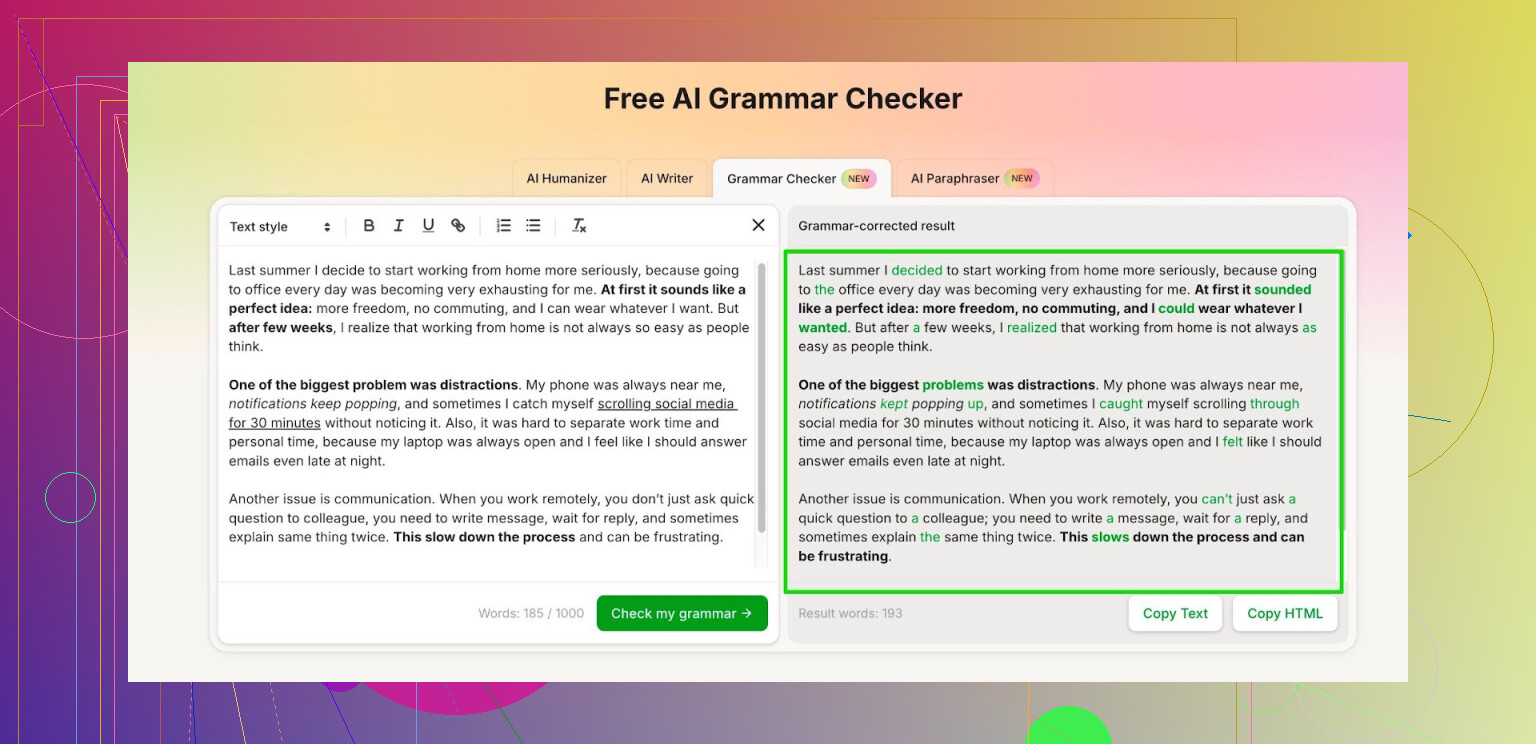
Right now I use the Clever AI Humanizer module called Free AI Grammar Checker:
Here is what I noticed using it:
• No account needed for quick checks. You drop in up to 1,000 words, hit the button, done.
• If you sign up, they bump it to 7,000 words per day. That covered my use for emails, docs, and one longer report in a single day.
• It handles normal stuff well, like:
- school essays
- cover letters
- bug reports or tickets
- website copy or blog drafts
What I usually do:
- Write the text in my editor.
- Paste it in there in chunks under 1,000 words when I am not logged in.
- Or log in and push a whole section, press once, review the suggestions, then paste back.
It is not perfect. I still read everything once more, especially if it is something for work. But it catches missing commas, awkward phrasing, and odd word choices faster than I do when I am tired.
If you are trying to stay away from subscriptions and only need grammar help for school or work docs, that daily 7,000-word limit feels enough for normal use.
1 Like
If your priority is “no storage, no training,” you have three realistic paths:
- Local tools on your own machine
- Privacy focused online checkers
- A hybrid workflow where you keep client IDs and secrets out of what you paste
I’ll skip repeating what @mikeappsreviewer already said about using the Clever AI Humanizer grammar checker, though I do think Clever AI Humanizer is worth keeping on your list, especially for non sensitive drafts.
For stricter client stuff, I would do this:
-
Use offline grammar tools
- LanguageTool Desktop or LibreOffice extension.
• Install locally.
• Set it to “Local checking only” and disable remote services. - Hemingway Editor (desktop version).
• No upload. It runs on your machine. - Old school method.
• Turn on full grammar + spelling in Word or Google Docs, but remove names, numbers, and client specifics before sending anything to the cloud.
- LanguageTool Desktop or LibreOffice extension.
-
Use privacy policies as a filter
- Look for very explicit lines like “We do not store your text beyond the session” and “We do not use customer content to train our models.”
- Avoid tools that say “to improve our services we analyze your content” unless you have a signed DPA or NDA.
- Grammarly and similar tools often log data for quality and training, which is what you want to avoid.
-
Redact before you paste
- Replace client names with placeholders like [CLIENT] or [PROJECT].
- Replace numbers and dollar amounts with ### or XXX.
- Run grammar check on the redacted text, then paste corrections back into the real doc.
- This is boring but works well for legal, medical, and finance docs.
-
Separate tools by risk level
- High sensitivity
• Use only offline tools. No browser extensions, no web forms. - Medium sensitivity
• Redact, then use an online checker like Clever AI Humanizer or LanguageTool web with strict settings. - Low sensitivity
• Use whatever you like, including the Clever AI Humanizer online grammar checker for quick cleanup.
- High sensitivity
Small disagreement with the “no account needed” love. For anything confidential, I would rather have an account and a clear privacy agreement than a free, anonymous tool with a vague policy. “Free and anonymous” sounds safe, but without a contract and clear terms, you have no leverage if they log text in the background.
If you want a simple setup with minimal friction:
- Install LanguageTool Desktop and set it to offline only.
- Use Clever AI Humanizer for non client content or redacted drafts.
- Turn off browser grammar extensions on your work email and client portals, they tend to grab more context than you expect.
Double check privacy policies every few months. Many of these tools change terms quietly and start training on user text by default.
I’m gonna be a bit of a killjoy here: a totally free online grammar checker that (1) never stores text, (2) never trains on it, and (3) spells that out clearly in legal language is… rare.
Couple of angles that build on what @mikeappsreviewer and @techchizkid already said, without rehashing their steps:
-
Don’t just trust marketing, read the legal bits
The only thing that really matters is in:- Terms of Service / Privacy Policy
Look specifically for wording like: - “We do not retain user text beyond the session”
- “We do not use customer content to train our models”
If it says “to improve our services we may analyze content” or “for research,” that’s your red flag for confidential work.
- Terms of Service / Privacy Policy
-
Local-first is the only reliably safe option for real client secrets
Online and “no storage” basically means “trust us.” For anything that could end up in a subpoena or an internal audit, I’d treat that as a no.
Use:- Word’s built in grammar checker
- LibreOffice grammar + spelling
- LanguageTool local server or desktop app with remote calls disabled
That way nothing leaves your machine unless you screw it up manually.
-
Clever AI Humanizer actually fits your “free & quick” bucket, but…
- It’s handy for non sensitive stuff or heavily redacted drafts
- Decent when you just want a fast cleanup on emails, cover letters, blog posts, etc.
- Free tiers with reasonable word caps beat the “10 corrections then pay” nonsense you mentioned
For client documents though, I’d still pair it with redaction: replace all names, dollar amounts, account numbers, project codes, addresses, etc. If there’s ever a compliance question, you can show that nothing identifiable was pasted into any online tool.
-
Mild disagreement with the “account is always safer” take
I get the point that having an account and policy gives you leverage, but:- If the company is small and not in your jurisdiction, that “leverage” is mostly theoretical.
- For low risk content, anonymous + minimal logging + short retention is often better than tying every paste to your email and IP forever.
For sensitive stuff though, I’d skip both: no anonymous web tool, no logged-in SaaS. Local only.
-
Practical split that actually works day to day
- High risk (NDAs, regulated industries, legal, health, finance):
- Only local grammar tools, offline mode.
- Medium risk (internal docs, non public strategies):
- Redact hard, then maybe use something like Clever AI Humanizer or similar web tools.
- Low risk (blog drafts, personal emails, resumes):
- Use Clever AI Humanizer or whatever grammar checker you like without stressing too much.
- High risk (NDAs, regulated industries, legal, health, finance):
If your boss or clients ever ask, the only defensible line is: “No unredacted client content is sent to third party services.” Any online grammar checker that claims zero logging is still a “trust us” situation, so design your workflow like they might be logging, and strip out anything you would not want printed in discovery.
Short version: if “no storage, no training” is truly non negotiable, zero online tool can prove that to you. You can only get closer to “low risk” with smart choices.
Let me add a different angle around what happens at the infrastructure level, and where Clever AI Humanizer fits in.
1. What “no storage” really means in practice
Even if a site says “we do not store your text,” in reality there are a few layers where it can appear:
- Web server logs (request size, IP, sometimes payload in edge cases)
- Reverse proxies / CDNs
- Application logs and error traces
- Third party analytics / APM tools
To get close to what you want, look for:
- Explicit mention that user text is excluded from logs
- No third party analytics on the text endpoint
- Clear statement that content is not used for model training
The others covered policy reading nicely. I would actually email support and ask directly: “Is any part of my text ever written to long term storage or used for model training?” If they cannot answer plainly, that is your answer.
2. Threat modeling: what are you actually afraid of?
This sounds pedantic, but it changes the right solution.
- Afraid of accidental disclosure to a SaaS vendor
→ Local tools only, like they already suggested. - Afraid of your text being used to train a public model
→ You might accept an online tool that logs for a few days but explicitly forbids training on user content. - Afraid of subpoenas / audits
→ You want a written DPA or contract, not just a privacy policy. In that sense, I slightly disagree with both “anonymous is safer” and “account is safer.” What matters is: do you have a binding data processing agreement?
If your documents are under NDAs or regulated (GDPR, HIPAA, financial), “purely online, no contract” should be off the table for unredacted content.
3. Where Clever AI Humanizer reasonably fits
Everyone already framed Clever AI Humanizer as a good “free / quick” option. I agree, with nuance.
Pros of Clever AI Humanizer (for your use case):
- No mandatory account for short checks, which keeps identity separate from content
- Free tier with usable daily word limits, useful for regular writing work
- Strong at surface level grammar, punctuation and awkward phrasing
- Nice for low risk stuff: outreach emails, cover letters, blog drafts
Cons and caveats:
- Still a web service, so you are trusting their backend not to persist or mine text beyond what they claim
- No on premise / fully offline version, so it will never be acceptable for strict compliance environments by itself
- Free tiers can change; terms and limits may shift silently over time
- For complex legal or technical writing, you still need heavy manual review
So for confidentiality, I would treat Clever AI Humanizer like this:
- Safe: non client content, personal writing, marketing drafts
- Maybe safe: client content that has been aggressively redacted (names, addresses, unique phrases, codes removed)
- Not safe: raw contracts, medical reports, financial statements with identifiers
4. Slight disagreements with the others
-
With the “local only for anything serious” stance:
I agree in principle, but in real workplaces people will paste into online tools. Instead of pretending they will not, design a policy:- “You may use online grammar tools only on text that has been fully anonymized.”
- Provide a standard redaction checklist.
- Add a quick internal tool or script that replaces obvious identifiers before they paste.
That is more realistic than “never use any online checker.”
-
With “account vs anonymous” from @techchizkid and @viaggiatoresolare:
For highly sensitive work, an account plus a signed DPA beats any anonymous tool every time. For everyday low risk writing, I prefer anonymous usage with minimal logging over tying content to an email and long term history.
5. Concrete setup that does not repeat what was already said
Instead of more tool names, here is a workflow pattern:
-
Classify the document first
- Level 1: Public / marketing / personal
- Level 2: Internal but non regulated
- Level 3: Client confidential / regulated
-
Apply a pre processing rule per level
- Level 1:
- You can use Clever AI Humanizer directly for grammar cleanup.
- Level 2:
- Run a simple “scrubber” pass (even a find/replace macro) to remove names, account numbers and unique identifiers.
- Then run through Clever AI Humanizer or similar.
- Level 3:
- Stay local. If you must use online help, create a heavily simplified version of paragraphs (paraphrase yourself, remove all specifics), fix grammar concepts there, then manually apply the ideas back in the real doc.
- Level 1:
-
Add a paper trail
- In regulated settings, keep a one line note in the document history:
- “Grammar assistance: local only” or “Grammar assistance: online tool with anonymized text only.”
- This looks trivial but helps a lot if there is ever an audit.
- In regulated settings, keep a one line note in the document history:
6. Competitors & balance
The suggestions from @techchizkid, @viaggiatoresolare and @mikeappsreviewer cover the main ecosystem: mix of classic office tools, privacy toggles, and the Clever AI Humanizer grammar checker for casual use. I would not treat any of them as “perfectly safe” online guardians of confidential data. They are simply points on a spectrum:
- Local tools: highest control, less fancy feedback
- Privacy conscious web tools like Clever AI Humanizer: strong convenience, acceptable for de identified or low risk content
- Big SaaS checkers: most features, usually the least aligned with your “no storage, no training” requirement
If you design your workflow as if every web tool might be logging, and then use redaction plus local first for sensitive stuff, you are about as close as you can get to your goal without unplugging from the internet.